
Grouped Bar Chart
Side-by-side bars per category, the comparison chart everyone reads correctly.
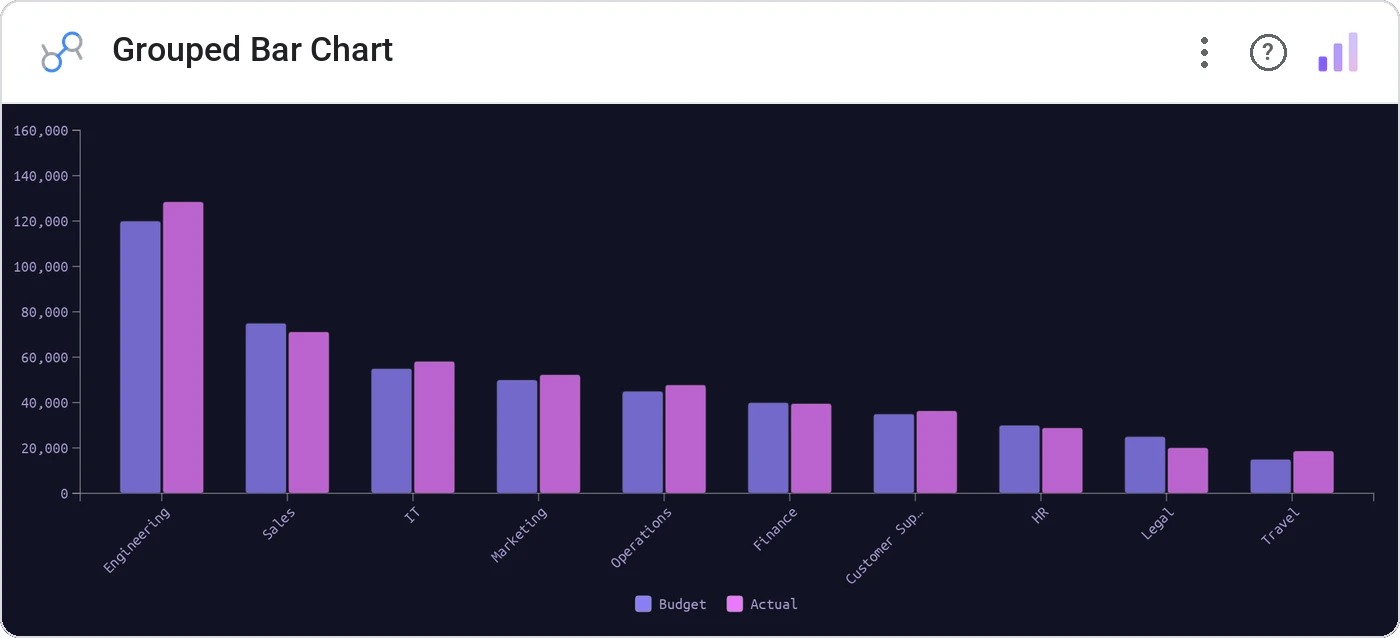
Grouped Bar Chart places two to four bars side-by-side within each category, sharing a y-axis and a legend. Cleaner than stacked when the absolute values per series matter more than the total.
Multi-series grouped bars per category with legend, tooltip, theme-aware colors, and cross-filter.
Stacked bars compress the smaller series. Grouped bars give every series equal real estate.
Three ways teams use it.
Current vs prior vs plan per region.
Spend vs revenue vs leads per channel.
Volume by shift across multiple sites.
Add it in 30 seconds.
Open your Data Studio report and click Add a chart → Community visualizations → Explore more.
Paste the Viz Studio manifest URL or pick this chart from the Viz Studio gallery card.
Bind the dimensions and metrics in the data panel. Done.
More from Bars, Columns & Ranking
All 75+ charts →
CI bars for A/B variants: significance baked in.
The animated bar chart race that wins every monthly review.

Animated curved columns: bars that arc to draw the eye.

Curved columns, static, the still-frame version with the same elegance.
Included in your vizstudio plan.
One plan, everything in it: the full library of 75+ charts. No per-seat upcharges, no metering. Build a real dashboard before you pay a cent.
Start free →